
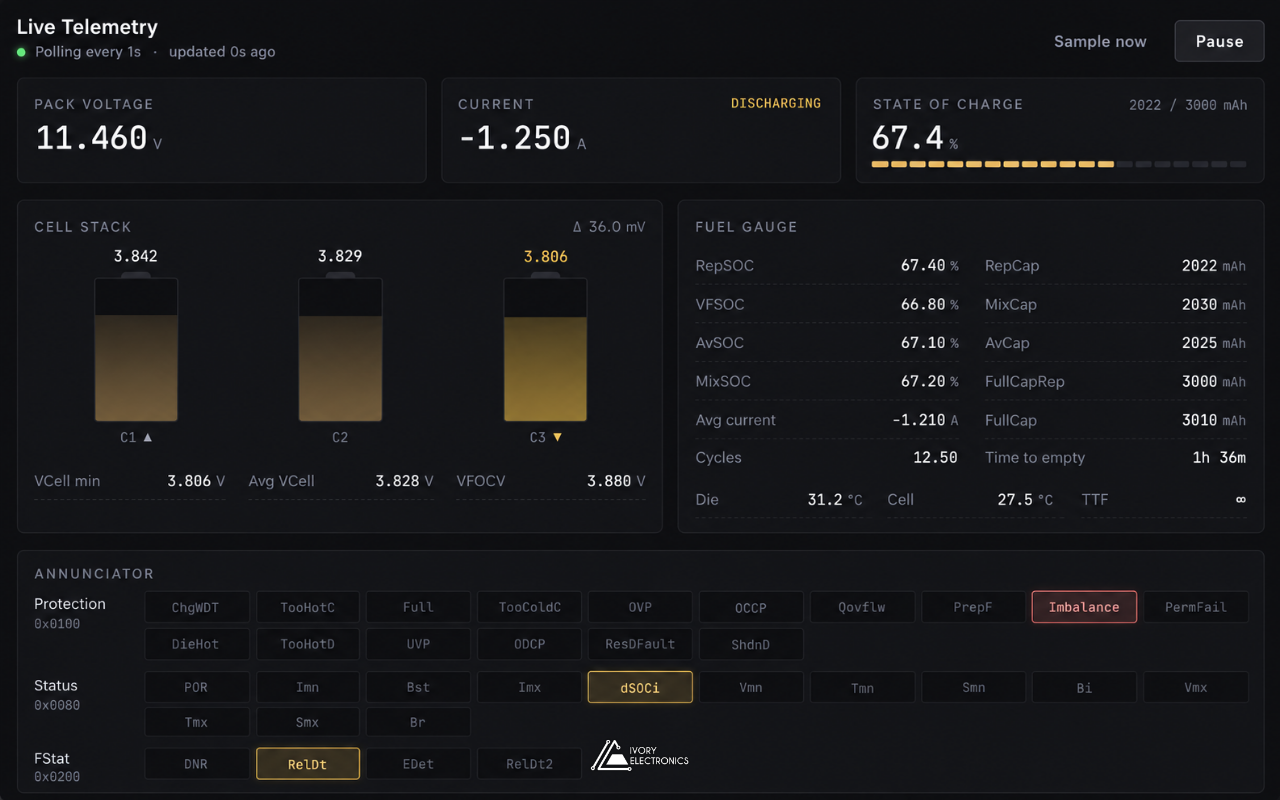
A desktop tool for a chip you can only program a handful of times A battery fuel gauge is the chip that tells a device how much charge is left. In many modern battery packs, the same chip also protects the cells against overvoltage, overcurrent and overheating. Its behaviour depends on a detailed configuration stored in on-chip memory. Getting that configuration right matters. A wrong value can make the state of charge drift, or make protection trip too early, or too late. And the memory that holds it can only be written a handful of times in the chip’s lifetime. So we built a desktop tool that makes battery fuel gauge configuration safe, visible and repeatable. What the tool does Hurdle 1: A memory you can only write a few times Most chips let you rewrite settings as often as you like. This one does not. Every permanent write uses up one of a small number of lifetime writes. Waste them, and the chip can no longer be updated. So the tool never writes permanent memory by accident. Changes go into the chip’s temporary working copy first. A soft reset then reloads the chip from that copy, so the new settings can be tested on real hardware as often as needed, without using a write. Only after testing does the commit step unlock. The operator must tick a confirmation box, and the button is disabled once no writes remain. A colour-coded gauge shows the remaining writes at all times: green is safe, amber means caution, red means almost none left. After a commit, the counter is read back from the chip to confirm it worked. Hurdle 2: Knowing exactly what will change A full configuration contains dozens of values. Writing all of them blindly is risky and hard to review. The compare view loads a configuration file and places it beside the values currently on the chip. Differences are highlighted, and a filter hides everything that already matches. The operator selects only the values that need to change, and writes just those. Hurdle 3: Raw registers mean nothing to people Inside the chip, everything is a 16-bit number. A voltage, a temperature and a status flag all look the same. The tool decodes each value into real units: volts, amps, milliamp-hours, per cent, degrees and time. Status and protection bits are turned into readable flags. The live view refreshes these values every second. Engineers can watch the battery fuel gauge respond as the pack charges or discharges, and check that a new configuration behaves as expected. Hurdle 4: Finding the hardware without fuss The chip sits behind a small microcontroller that acts as a USB bridge. Serial port names change between computers and cables, so asking the user to pick one is error-prone. On launch, the tool offers auto-connect. It scans the ports, finds the one that answers, confirms the chip is on the bus, reads the configuration and checks the write counter. Each step is shown on screen. If anything fails, it falls back to manual port selection with a clear error message. Keeping a record Configurations can be saved as named profiles, with a description, and exported as files for sharing or archiving. Profiles work offline, so a configuration can be prepared before the hardware is even on the bench. A log tab records every message between the app and the device. Entries are time-stamped to the millisecond and colour-coded by direction. The log length is capped, so long sessions stay fast. Under the hood The bridge speaks a simple, line-based text protocol, which makes it easy to debug and to extend. The same code builds native installers for macOS, Windows and Linux. Where it fits The tool supports both development and production. Engineers use it to tune and validate a battery fuel gauge configuration. The same tool then applies that proven configuration to each new pack, with the same checks every time. Working on battery fuel gauge configuration, battery pack production or custom engineering tools? We would like to hear about it. Visit www.ivory-electronics.com
Designing Electronics for the Edge of Space
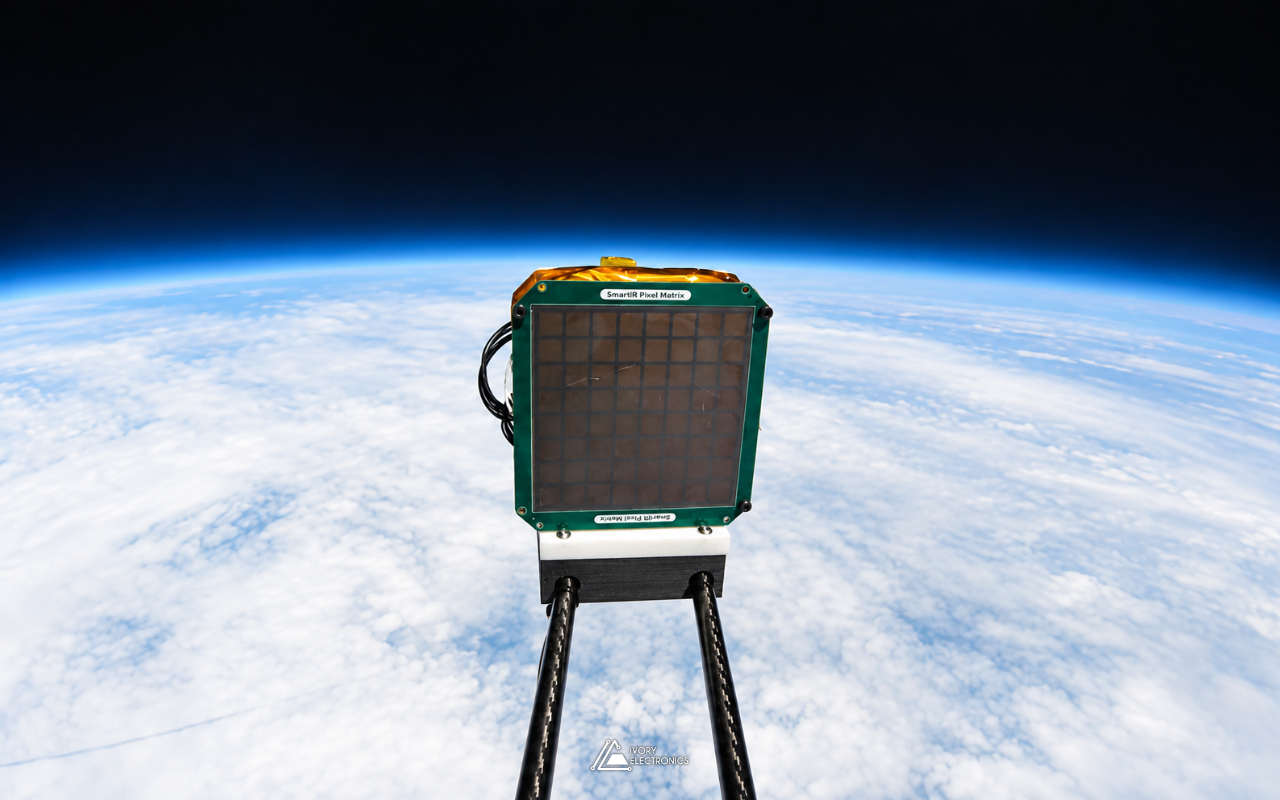
What it takes to fly a circuit board on a stratospheric balloon On 1 May 2023, a square green tile rode a weather balloon up through the atmosphere until the sky behind it turned black and the Earth’s horizon curved beneath it. The tile was SmartIR’s graphene smart radiator, and the flight was the company’s Mission 1, launched in collaboration with Sent Into Space. Behind the tile sat the circuit board that drove it, designed by our CEO, Dr. Daniel Melendrez, together with Prof. Coskun Kocabas of the University of Manchester. This post is about that board, and about what changes when the hardware you design is going to leave the ground. The mission, in public terms SmartIR is a University of Manchester spin-out developing graphene-based adaptive radiators: thin, lightweight devices that control how a surface emits heat, electronically and with no moving parts. That capability matters in space, where, as the ESA Business Incubation Centre UK has noted, satellites can experience temperature variations of more than 400 °C. Before orbit comes the stratosphere, and Mission 1 was the first time the technology left the lab. Our part was the electronics that sat between the payload’s controller and the multi-pixel tile. We will leave the device physics to SmartIR. What follows is the electronic design perspective: what the board had to be, and what the flight environment demanded of it. The requirements came down to a few words: The result is a six-layer board, about ten centimetres square, with fewer than 30 footprints, logos included. The revision code on the silkscreen reads Rev. A-0323: designed in March 2023, flying by May. Challenge 1: The cold In the International Standard Atmosphere, air temperature falls to about −56.5 °C at the tropopause and stays there for kilometres. That is below the −40 °C lower limit of the industrial temperature grade that most commercial parts are specified to. For a balloon payload, this means component ratings are the start of the conversation, not the end: Challenge 2: Almost no air Sent Into Space’s balloons typically climb to around 38 km before they burst. Up there, pressure is well under 1% of sea level, and convection, the mechanism most electronics quietly rely on to shed heat, all but disappears. Heat has to leave by conduction through the board and its mounting, or by radiation. There is a neat irony here: that is exactly the physics a radiator experiment is about, and the driver electronics are subject to it too. Keeping dissipation low and spreading it through copper planes is a design choice, not an afterthought, when the air cannot help. Challenge 3: The ride itself A balloon flight is not gentle. There is handling at launch, a long ascent, the burst at peak altitude, and a parachute descent to wherever the wind decides. Along the way the payload may pass through cloud layers where cold hardware can collect moisture. Flight-worthy electronics answer this with restraint: Challenge 4: The calendar Flight opportunities do not wait for a design to feel finished. This board went from revision A to launch in roughly two months. That puts a premium on getting it right first time: choosing well-documented parts, reading the datasheet’s fine print (one of the schematic notes is simply “Read pages 7 & 8 from Datasheet”), and building in configuration options so that small changes in requirements can be absorbed without a respin. The footprint nobody sells One of the more interesting parts of the design is not a component at all. The contact pattern between the board and the tile matches the tile’s own geometry, and no library in the world has it. It was generated by a script as a single custom footprint, with every contact positioned exactly and labelled for assembly and inspection. Programmatic generation means the geometry is consistent across the whole array, and a change to the tile becomes a parameter change rather than an afternoon of manual editing. It is a small example of a broader habit: when the tools do not have what the hardware needs, build the tool. Flight day SmartIR‘s own mission update is candid that the launch came “despite last-minute technical challenges”, and credits the teamwork between SmartIR and Sent Into Space for getting it off the ground. The driver board did its job: it flew on Mission 1 and drove the tile as intended, while SmartIR’s adaptive thermal tiles were, in the company’s words, “put to the test in near-space conditions”. Mission 1 was the first step. SmartIR has since taken its graphene radiator to low Earth orbit, launching on SpaceX’s Transporter-12 in January 2025 and on Transporter-13 in March 2025. What we took from it Hardware for a flight test is an exercise in restraint. The best decisions on this board were the ones that removed things: fewer wires, fewer parts, no moving configuration, and a power-up state that does nothing until it is told to. The same instincts shape everything we build at Ivory Electronics, whether it is headed for the stratosphere or a lab bench. If you are developing a novel device that needs electronics to drive it, test it or take somewhere unusual, we would be glad to help. Find us at www.ivory-electronics.com
One Cable In, Every Rail Accounted For
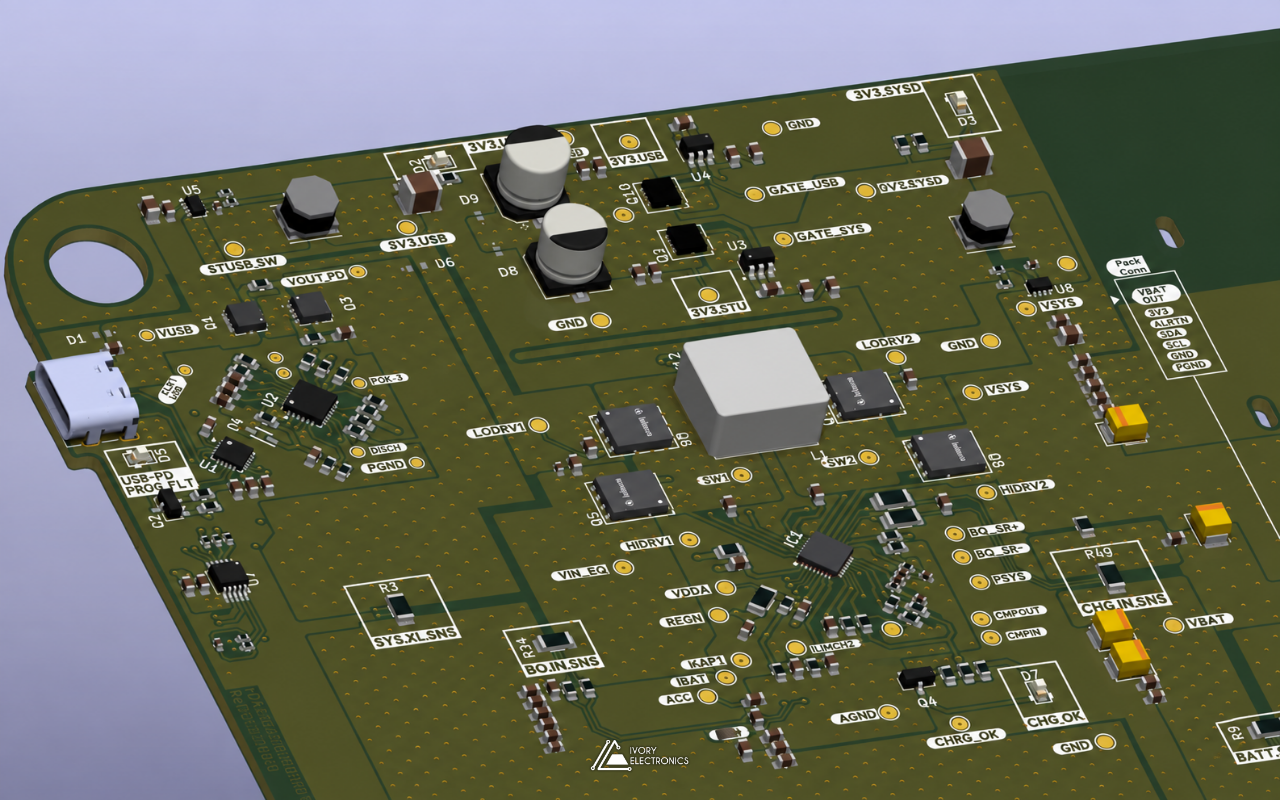
Designing a USB-C Power Delivery smart battery management board Plug a USB-C charger into a laptop and it just works. Behind that simplicity is a small negotiation, a converter that has to decide whether to step voltage up or down, and a power path that keeps the system alive whether the battery is full, flat or missing. We recently designed, built and bench-validated a board that does all of that for a battery-powered product. We can’t talk about the product it serves, but we can talk about the engineering, and about the places where this kind of design tends to bite. What the board has to do In one sentence: take power from a USB-C source, negotiate the right voltage, charge a multi-cell battery pack, feed the system from whichever source is available, and report every watt that moves along the way. In block form: Each block is well documented on its own. The difficulty is in the seams between them. Hurdle 1: USB-C power is negotiated, not delivered A plain USB-C port only gets 5 V. Anything more has to be requested over the CC lines, and the sink has to do that before any firmware is running, because the board may be starting from a flat battery. Standalone PD sink controllers solve this by loading their configuration from on-chip non-volatile memory at power-up. That is convenient, but it moves part of the design into a configuration step: the requested voltage profiles have to be correct before the board leaves the bench, and the vendor’s own documentation warns that this memory tolerates only a few thousand write cycles. It is not a scratchpad for experiments. The connector is also the most exposed point on the board. We protected the CC and VBUS lines with dedicated USB-C protection and TVS devices, because a PD source can legitimately present up to 20 V on VBUS, which sits right next to the CC pins on a USB-C receptacle. Hurdle 2: A charger that must be right before the MCU wakes up A buck-boost charger is really two converters sharing one inductor, switching at hundreds of kilohertz through four external MOSFETs. Two things drive most of the layout effort: The part we like most about this class of charger is that its critical limits can be set in hardware. The battery cell configuration is selected by a resistor divider, and the input current limit is set by a pin voltage. The device then applies the lower of the pin setting and the register value. Getting those divider calculations right means the board is safe from the first power-up, even with blank firmware. We annotated each of those calculations directly on the schematic so the next engineer can check the maths without digging through our notes. Hurdle 3: Keeping 3.3 V alive through every transition The supervisory electronics must stay up while the cable is inserted, removed, or while the battery takes over. Instead of relying on one regulator, we generate 3.3 V twice, once from the USB input path and once from the battery side, and combine them with ideal-diode controllers driving external MOSFETs. Compared with Schottky ORing, this keeps the forward drop low and blocks reverse current between the rails. The system output goes through a back-to-back MOSFET switch with its own controller and an enable line, so the load can be disconnected under firmware control. Hurdle 4: Buses that leave the board I²C is easy until it runs through a connector to hardware that can be hot-plugged. A peripheral reset mid-transaction can hold SDA low forever, and live insertion can glitch a running bus. We placed hot-swap I²C buffers on both external links: one to the battery pack’s fuel gauge and one to the host electronics. The class of buffer we used pre-charges the lines to about 1 V before connecting, isolates bus capacitance, and, if a line stays low for around 40 ms, clocks out up to 16 pulses to free the stuck device. Phantom powering is a quieter problem. When a powered board drives logic-high into an unpowered neighbour, current leaks through the neighbour’s input protection diodes and half-powers it. Engineering forums are full of reports of MCUs that fail to start for this reason. Our answer was open-drain buffers on the signals that cross to the host board, with the pull-ups on the receiving side, so no signal can supply power to a board that is switched off. Hurdle 5: Measure everything A smart BMS is only as smart as its telemetry. Three independent high-side monitors report voltage, current and power at the input, the battery and the system output, so firmware can close the energy balance and catch anomalies. A local temperature sensor, EEPROM for non-volatile storage, and a factory-programmed unique-ID EEPROM round it out. The unique ID lets the controller identify exactly which board is fitted, which pays off in production traceability and field support. Layout: six layers, one side The final board is a six-layer design carrying over 500 footprints and more than 2,000 vias. An eight-layer, double-sided build was on the table early on; we settled on single-sided assembly, which generally keeps assembly simpler and cheaper. Power ground and digital ground are handled as separate nets and tied at a defined point, so switching currents stay out of the measurement and logic reference. We exported STEP models throughout, so the industrial design could keep pace with the electronics. How we work The project lives in KiCad as hierarchical sheets, one per functional block, under Git with branches and pull requests between engineers. The BOM carries assembly-house part numbers, so what we review is what gets placed. Reviews, calculations and design intent are kept next to the schematic, not in someone’s head. The result The boards were manufactured and validated on the bench: PD negotiation, battery charging, power-path switching and the full I²C sensor chain all working as designed. If your product needs power delivery, battery management, precision measurement and embedded control on one